---
title: Reverse Creditor Payment
description: Reverse Creditor Payment
---
[Skip to content](https://knowledge.ezysys.com.au/fox-support/reverse-creditor-payment#main-content)
English - Australia
Show submenu for translations

- Home
- Products
- Pricing
- Blog
- Company
Open main navigation
Close main navigation
- Home
- Products
- Pricing
- Blog
- Company
- English - Australia
Show submenu for translations
- Contact us
Contact us
How can we help you?
- There are no suggestions because the search field is empty.
1. [Fox Support Centre](https://knowledge.ezysys.com.au/fox-support?hsLang=en-au)
2. [Accounts Payable](https://knowledge.ezysys.com.au/fox-support/accounts-payable?hsLang=en-au)
# Reverse Creditor Payment
## This article is designed to explain how to reverse a Creditor Payment made to the wrong Supplier
#### **[Confirm payment was made to the wrong supplier](https://knowledge.ezysys.com.au/fox-support/reverse-creditor-payment#Con-wrong-pay)**
#### **[Reverse payment](https://knowledge.ezysys.com.au/fox-support/reverse-creditor-payment#Reverse_Payment)**
#### Confirm Incorrect Payment to Supplier
Check Trial Balance and confirm creditor is still outstanding. Trial Balance reports can be found in Accounts Payable \> A/P Reports. There are several options: Trial Balance; Detail Trial Balance; and Trial Balance By Due Date.
Check Creditor Drill Down for payment reference and date of payment made to wrong creditor. Go to Accounts Payable \> A/P Reports and Drill Down Enquiry is the final menu option.
**💡Tip: Use the original invoice reference to create the audit trail through the system**
#### Reverse Payment
- Go to Accounts Payable \> A/P Invoice & Adjustments \> Invoice & Adjust Entry and insert a new batch
- Enter the code of the creditor who was incorrectly paid
- Change the Transaction Type to Debit Adjustment
- Enter the GL code for the bank account
- Make sure GST is not included in the transaction
- When the Debit Adjustment is updated, it will record the payment going back into the bank account and will restore the balance against the creditor
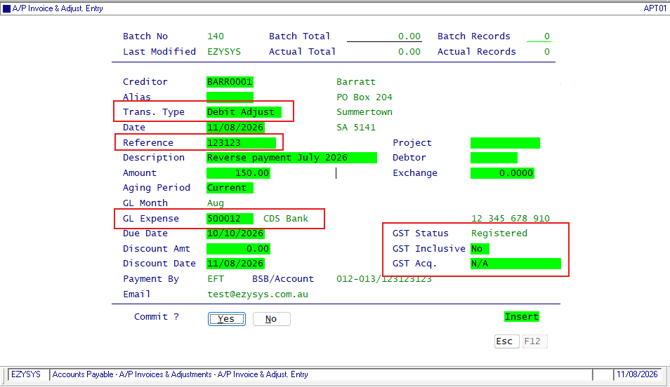
📌**Please note:** the Debit Adjustment will not recreate lines of an invoice (such as from a Purchase Order Receipt). It will only put the balance owed back onto the creditor for payment to be made at a later date.
Process payment to the correct creditor using A/P Payments \> Creditor Payment Maintenance
- [FAQs](https://knowledge.ezysys.com.au/fox-support/faqs?hsLang=en-au)
- [Troubleshooting](https://knowledge.ezysys.com.au/fox-support/troubleshooting?hsLang=en-au)
- [General](https://knowledge.ezysys.com.au/fox-support/general?hsLang=en-au#main-content)
- [Enhancements](https://knowledge.ezysys.com.au/fox-support/general?hsLang=en-au#enhancements)
- [User Access](https://knowledge.ezysys.com.au/fox-support/general?hsLang=en-au#user-access)
- [Payroll & Human Resources](https://knowledge.ezysys.com.au/fox-support/payroll-human-resources?hsLang=en-au#main-content)
- [Superannuation](https://knowledge.ezysys.com.au/fox-support/payroll-human-resources?hsLang=en-au#superannuation)
- [Data Set Up](https://knowledge.ezysys.com.au/fox-support/data-set-up?hsLang=en-au)
- [Accounts Payable](https://knowledge.ezysys.com.au/fox-support/accounts-payable?hsLang=en-au)
- Home
- Products
- Pricing
- Blog
- Company
[](http://www.ezysystems.com.au)
[mailto:email@email.com](mailto:email@email.com)
Copyright © 2026, Ezy Systems