
2. Creating a Login — Windows Authentication
3. Creating a Login — SQL Server Authentication
4. Assigning the dbcreator Server Role
5. Mapping to a Database and Assigning db_datareader / db_datawriter
1. Prerequisites
| Requirement | Detail |
| Server auth mode | Must be set to Mixed Mode if you want SQL logins (Windows-only mode blocks SQL auth) |
| Permissions | You need sysadmin or securityadmin + dbcreator to create logins and assign roles |
| Tool | SSMS connected to the instance, or sqlcmd / query window |
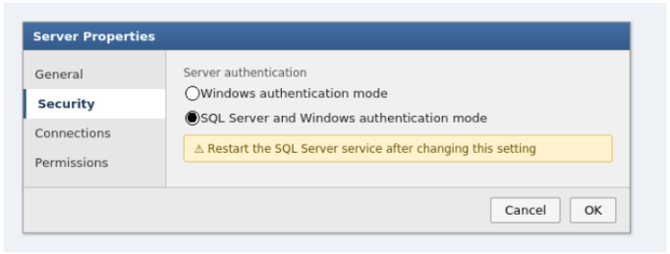
Check/change authentication mode
1. Right-click server in SSMS → Properties → Security
2. Under Server authentication, select SQL Server and Windows Authentication mode
3. Click OK, then restart the SQL Server service (this setting only takes effect after restart)
2. Creating a Login — Windows Authentication
GUI method (SSMS)
1. Expand Security → right-click Logins → New Login…
2. Login name: click Search… and select the domain/local Windows user (format: DOMAIN\username or
MACHINENAME\username)
3. Authentication type is fixed to Windows Authentication automatically
4. Set Default database if required
5. Go to Server Roles page → tick dbcreator (see Section 4)
6. Go to User Mapping page → tick the target database → assign db_datareader and db_datawriter (see Section 5)
7. Click OK

3. Creating a Login — SQL Server Authentication
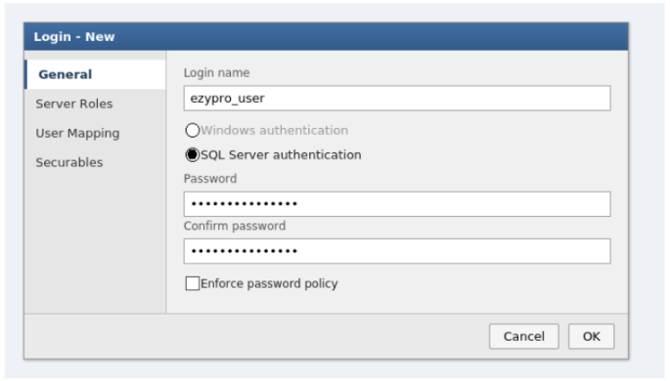
GUI method (SSMS)
1. Expand Security → right-click Logins → New Login…
2. Login name: type the desired username (e.g. ezypro_user)
3. Select SQL Server authentication
4. Enter and confirm password
5. Optionally untick Enforce password expiration if this is a service account
6. Go to Server Roles page → tick dbcreator
7. Go to User Mapping page → tick the target database → assign db_datareader and db_datawriter
8. Click OK
4. Assigning the dbcreator Server Role
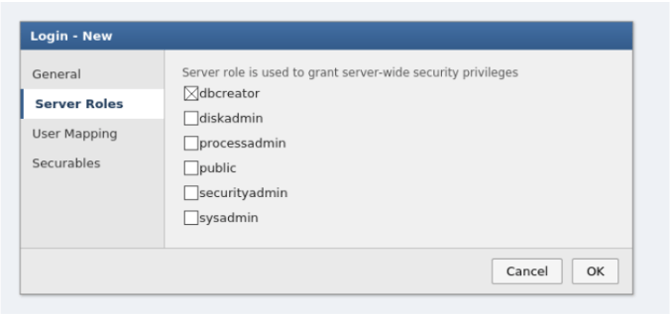
dbcreator is a server-level role, granted once per login (not per database).
GUI method
On the Server Roles page of the login properties, tick dbcreator.
5. Mapping to a Database and Assigning db_datareader / db_datawriter
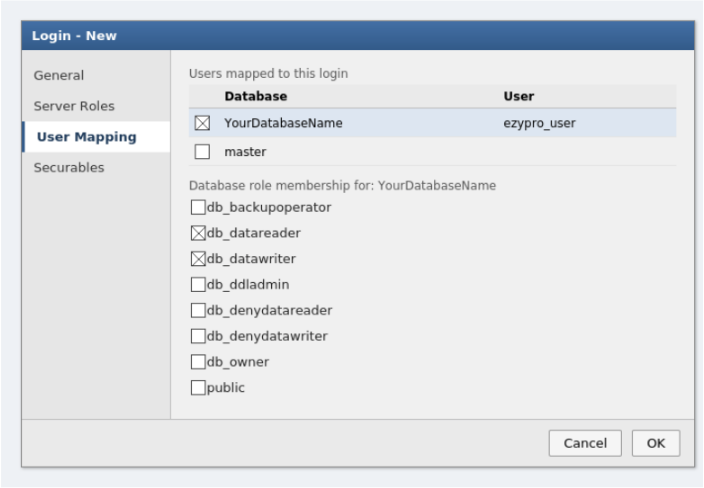
A login has no access to a database until it's mapped to a database user. This must be repeated per database.
GUI method
1. In the login's User Mapping page, tick the checkbox next to the target database
2. In the Database role membership grid below, tick db_datareader and db_datawriter
3. Click OK
Notes
| Issue | Fix |
| SQL login created but can't connect |
Server is likely still in Windows-only auth mode; check Section 1, restart service after changing |
| Login exists but user gets "login failed" for specific DB |
No mapped database user exists yet, run CREATE USER inside that DB |
| dbcreator doesn't give data access | It only allows creating/altering/dropping databases; you still need db_datareader/db_datawriter for data access inside each DB |
| Windows login format wrong | Must include domain or machine prefix: DOMAIN\username, not just username |
| Password rejected on SQL login | CHECK_POLICY = ON enforces Windows complexity rules (length, mixed case, digits, symbols) |